> For the complete documentation index, see [llms.txt](https://officex.gitbook.io/officex-docs/llms.txt). Markdown versions of documentation pages are available by appending `.md` to page URLs; this page is available as [Markdown](https://officex.gitbook.io/officex-docs/documentation/getting-started/2-min-quickstart.md).
# 2 Min Quickstart
Start here if you are a new OfficeX developer
Anonymous OfficeX is designed for whitelabel with zero dependencies. Any developer can create anon workspaces for their users in just 2 mins.
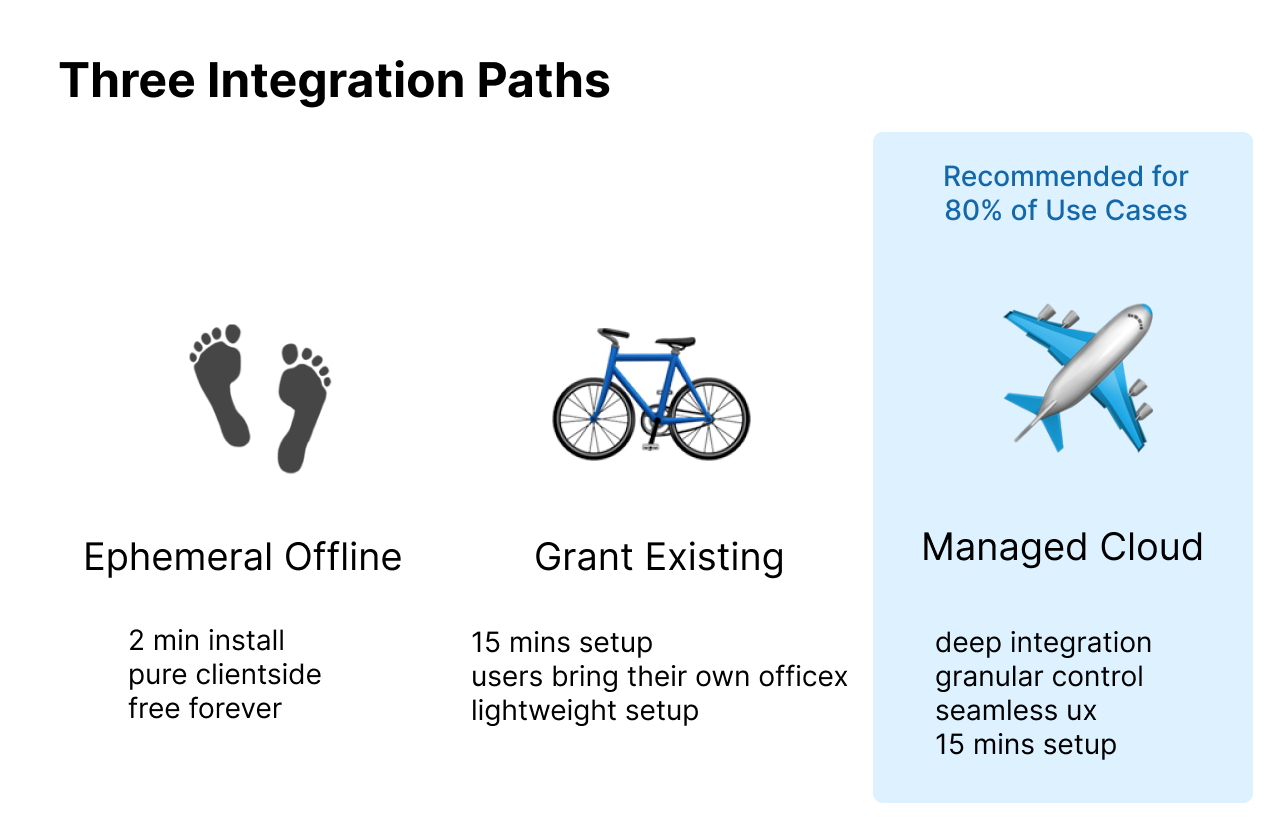
There are 3 possible integration paths. Click the links to see exact guides. This 2 min quickstart will focus on the `Managed Cloud` option, which is ideal for most use cases.
1. [Ephemeral Offline](https://officex.gitbook.io/officex-docs/documentation/~/changes/41/getting-started/iframe-guide#tab-ephemeral-offline-mode)
2. [Grant Existing](https://officex.gitbook.io/officex-docs/documentation/~/changes/41/getting-started/grant-existing)
3. [Managed Cloud](https://officex.gitbook.io/officex-docs/documentation/~/changes/41#free-public-cloud-quickstart) (recommended)
View Comparison Diagram
### Free Public Cloud - 2 Min Quickstart
The below `/quickstart` REST API call is the bare minimum needed to integrate with OfficeX Cloud (assuming you want cloud - its possible to work offline too). This will create a fresh installation in our free public cloud, along with a magic link url that you can open in browser to enter your workspace.
If you want to give all your users their own workspace, you can view the `Reuse Existing IDs` tab to see how to deterministically generate the same officex profile per userid from your database.
By default, officex workspaces do not include cloud storage (although anyone can permissionlessly purchase storage from the public marketplace). See the `Bundle with Storage` tab If you want to provide free default cloud storage for your users.
Note: `/quickstart` is only available on traditional web2 server environments. If you want decentralized trustless workspaces on web3, you will need a multi-stage deployment seen in the[ Advanced Setup](/officex-docs/documentation/getting-started/advanced-setup.md).
{% tabs %}
{% tab title="Quickstart" %}
Barebones installation example. You do not even need to provide an `org_name` .
Try in Codepen
```javascript
// try this in browser js console
const logins = await (
await fetch(`https://officex.otterpad.cc/v1/factory/quickstart`, {
method: "POST",
headers: { "Content-Type": "application/json" },
body: JSON.stringify({ org_name: "Anonymous Org" }),
})
).json();
console.log(logins);
```
Scroll down further to see example of returned `logins` object
{% endtab %}
{% tab title="Reuse Existing IDs" %}
For example, you are a Discord clone that wants to provide anon workspaces for your users. You have thousands of "communities" with members, each of whom are a "user", and users can belong to many communities.
The below `/quickstart` code shows how you can create an officex org and users deterministically. The key is the `secret_entropy` string, which is like a password seed phrase to generate an officex user (which is really just a crypto wallet). The same `secret_entropy` string will create the exact same wallet every time.
The other field to notice is `tracer` which is a convenience string for you to easily map your original IDs to your new officex IDs.
The `/quickstart` abstracts away the multi-stage process of creating an org and users. If you want improved security and granular control, see the [Advanced Setup](/officex-docs/documentation/getting-started/advanced-setup.md) page. There you can create those officex user crypto wallets offline, make redeemable placeholder orgs, and other advanced functionality.
For this exact example, click the `Returns` accordion below to see what the returned `logins` object looks like.
Try in Codepen
```typescript
import { IRequestQuickstart, IResponseQuickstart } from "officexapp/types"
const MY_SECRET = "this_can_be_any_string"
const body: IRequestQuickstart = {
email: "admin@company.com",
org_name: "Adams Discord Community",
note: "This was programmatically created per Discord community",
tracer: "DiscordOrgID_123",
admin: {
name: "Adam",
secret_entropy: `${"DiscordUserID_123"}_${MY_SECRET}`,
tracer: "DiscordUserID_123"
},
members: [
{
name: "Benjamin",
secret_entropy: `${"DiscordUserID_456"}_${MY_SECRET}`,
tracer: "DiscordUserID_456"
}
]
}
const logins: IResponseQuickstart = await (
await fetch(`https://officex.otterpad.cc/v1/factory/quickstart`, {
method: "POST",
headers: { "Content-Type": "application/json" },
body: JSON.stringify(body),
})
).json();
console.log(logins);
```
Scroll down further to see example of returned `logins` object
{% endtab %}
{% tab title="Bundle with Storage" %}
For example, you are a school that wants to provide officex workspaces to all classrooms, with subsidized free cloud storage included. You can use the `bundled_default_disk` field to attach an Amazon S3 bucket (or any S3-compatible storage).
If you don't have an AWS account, you can permissionlessly buy storage from the official OfficeX vendor marketplace. Or your devops team can bring their own.
Note that if you are providing temporary storage, such as AWS S3 file lifecycles, use the `autoexpire_ms` field to ensure OfficeX displays the proper expiry dates of files. This helps avoid cost overages with your cloud provider. You may omit this field if not applicable.
Try in Codepen
```typescript
import { IRequestQuickstart, IResponseQuickstart, DiskTypeEnum } from "officexapp/types"
const body: IRequestQuickstart = {
org_name: "History Class of 2025 Winter",
note: "Springfield High School",
// must be aws s3 compatible storage
bundled_default_disk: {
name: "Default Cloud Storage",
public_note: "This is subsidized by school",
disk_type: DiskTypeEnum.AwsBucket, // "AWS_BUCKET"
autoexpire_ms: 1000 * 60 * 24 * 365, // files only last 1 year
endpoint: "https://springfieldhs.edu/teacher-resources/123",
// aws iam credentials for the s3 bucket
auth_json: {
endpoint: "https://s3.amazonaws.com";
access_key: "____________";
secret_key: "____________";
bucket: "________________";
region: "us-east-1";
}
}
}
const logins: IResponseQuickstart = await (
await fetch(`https://officex.otterpad.cc/v1/factory/quickstart`, {
method: "POST",
headers: { "Content-Type": "application/json" },
body: JSON.stringify(body),
})
).json();
console.log(logins);
```
Scroll down further to see example of returned `logins` object
{% endtab %}
{% endtabs %}
After you call the `/quickstart`, it will return you a "logins" object of type `IResponseQuickstart` which contains all the data you need to continue.
* `organization.drive_id` this is your official organization id which is necessary for subsequent REST API calls
* `organization.host_url` is the domain of your org backend server. This also gets encoded as a url safe string inside `organization.frontend_url`.
* `organization.frontend_url` is the prefixed frontend url for your org. You can use it to programatically navigate to routes such as `${organization.frontend_url}/settings`
* `user_id` is your official officex user id, also a crypto public key (but do not use it as a wallet, its just for cryptography)
* `api_key_value` is the token you can use in REST API calls, as header `Authorization: Bearer api_key_value` to which represents that user
* `auto_login_url` is a url link for a user to open in browser. It will take them to and automatically login them in.
* `auth_json` is an object used by iframes to login a user and render UI within your own app. See the [iFrame Guide](/officex-docs/documentation/getting-started/iframe-guide.md) to learn more.
* `tracer` is the exact same string you passed into initial `/quickstart` call. Typically this would be an original ID from your database. It is a convenience string for you to easily map your original IDs to your new officex IDs.
This has all the info you need to continue. Give your users the `auto_login_url` if you want them to use officex directly, or use the `auth_json` if you want to control the UX from within your app with iframes. You might also use the `api_key_value` to perform subsequent setup actions on behalf of users.
```typescript
import { IResponseQuickstart, IFrameInjectedAuth } from "officexapp/types"
const logins: IResponseQuickstart.ok.data = {
organization: {
drive_id: "DriveID_sx6t2-bwmyg-34dko-jghjx-cxwkv-ucsa3-vkm53-6zppl-fxm6u-swo4d-mqe"
org_name: "Adams Discord Community",
host_url: "https://officex.otterpad.cc",
frontend_url: "https://officex.app/org/DriveID_sx6t2-bwmyg-34dko-jghjx-cxwkv-ucsa3-vkm53-6zppl-fxm6u-swo4d-mqe__aHR0cHM6Ly9vZmZpY2V4Lm90dGVycGFkLmNj",
tracer: "DiscordUserID_456"
},
admin: {
user_id: "UserID_gbu2g-lduz2-mlo7z-gpkac-jytn3-tqh24-pj2hb-5zjw4-x5va6-dfb5y-yae",
api_key_value: "API_KEY_FOR_UserID_gbu"
auto_login_url: "https://officex.app/auto-login?token=eyJvcm...",
auth_json: IFrameInjectedAuth;
tracer: "DiscordUserID_123"
},
members: [{
user_id: "UserID_q3tec-umjm4-kl7jk-zwi6l-7hjj4-7m7ba-xprr7-kur7x-c2mv2-lub65-2qe",
api_key_value: "API_KEY_FOR_UserID_q3t",
auto_login_url: "https://officex.app/auto-login?token=ad4vcm...",
auth_json: IFrameInjectedAuth;
tracer: "DiscordUserID_456"
}]
}
```
The easiest next step is to just give users their `auto_login_url` which gives them the full OfficeX experience directly at [https://officex.app](https://officex.app/), as seen in the GIF video below.
If you are embedding OfficeX within your app, continue to this next page [iFrame Guide](/officex-docs/documentation/getting-started/iframe-guide.md) below.
Note that `/quickstart` is a convenience method that abstracts away the multi-step process of creating an organization, generating cryptographic users, api keys & auto-login urls. If you want more granular control over the process, see the [Advanced Setup](/officex-docs/documentation/getting-started/advanced-setup.md) page.
.gif?alt=media&token=71353c8b-9e9f-4152-adc9-28a6fe3e521c)